Applications and decisions in OmaKela
Tällä sivulla
You can apply for almost all Kela benefits in the OmaKela e-service (available in Finnish and Swedish). If there is no online application for a certain benefit, you have to fill in a form to apply for it. Most forms are available in English. Submit the completed form to Kela in OmaKela or send it to us by post. When you send your application form in the OmaKela e-service, you do not need to sign it. You can also apply for some benefits on behalf of another person in OmaKela.
Go to the benefit-specific page on Kela’s website for more information on how to apply and what supporting documents you need to submit. For example, you may need to submit a bank statement (tiliote), lease agreement, medical certificate or rehabilitation plan as a supporting document with your application.
Do you need help with applying for benefits? Call our customer service.
How to submit an application in OmaKela
- Go to Tee hakemus tai ilmoita muutoksista (Submit an application or report changes) and choose the benefit you want to apply for.
- Fill in the application and tell us about your situation as fully and clearly as you can. You have to fill in all required sections to be able to continue with the application.
- At the end of the application, you will be shown the information you have entered and asked to check it. Click or tap Hyväksy (Accept) to send your application. You will get a confirmation message telling you that Kela has received your application.
- After you have submitted your application, remember to send us all necessary supporting documents. Check the benefit-specific page on Kela’s website for a list of the supporting documents you need for your application.
If you submit your application online, it will be saved in OmaKela and Kela’s processing system. We will then start processing your application as soon as possible. If you go to Oma asiointi (My page) in OmaKela, you will see an estimate of how long it will take us to process your application.
You can save some applications when they are incomplete. When you save an incomplete application, it will not be submitted to Kela for processing. You need to complete the application and submit it before we can start processing it. Your incomplete application will remain available in OmaKela for 30 days.
When you want to continue filling in the application, you will find it on the front page under Oma asiointi (My page).
How to submit supporting documents in OmaKela
After you have submitted an application, you can send us the necessary supporting documents.
- Go to Lähetä liite (Send supporting documents).
- Select the supporting document you want to send.
- Choose the file you want to send on your device. Your can submit photos of your supporting documents or use some other file format. You can select up to 20 files to send in one session. The file format can be PDF, jpg, png, tiff or heic. The maximum file size is 10 Mt.
- If you want to send photos of your supporting documents, you can take the photos at this point. Please remember to take a photo of every page of the document. Select the photos of all the pages and send them at the same time. How to take a clear photo?
- Check the files you have selected before you send them. At this point, you can still delete them if you need to.
- After you have checked your attached files, select Lähetä (Send). You cannot remove files after you have sent them in.
- You will get a confirmation message telling you that Kela has received your supporting documents. If the files fail to send, you will see an error message.
Call our customer service if you need help with sending supporting documents.
Things to note about supporting documents
You can see applications with missing supporting documents on the Lähetä liite (Send supporting documents) page. If you have not sent your supporting documents yet, you will see a red reminder. The reminder will disappear after you have sent the required supporting documents.
You will also see a reminder on the front page of OmaKela if a supporting document is missing or we need more information. The reminder will disappear when the Kela employee assigned to your case starts processing your application again.
When you submit supporting documents, you can either select files from your device or take a photo of the supporting documents. Tips for taking clear photos:
- Make sure the photo only shows the document and nothing else.
- Check that your camera is focused on the document. Keep your hand steady or prop your camera on something when you take the photo to make sure it is not blurry.
- Do not use flash. White paper is easily overexposed in photos. This means that the white background is so bright in the photo that we cannot see the black text printed on the page. Make sure you have good lighting (such as daylight) when you take the photo.
- Check that the photos are sharp and the text is easy to read before you send the photos to us.
How to view decisions and letters in OmaKela
You can find decisions and letters Kela has issued to you in the OmaKela e-service under Päätökset ja muut asiakirjasi (Decisions and other documents). You will get a notification when you have new mail in OmaKela.
Decisions and letters are stored in OmaKela for 6 years. If you need a decision that was issued more than 6 years ago, you can ask us to send it to you by post. Send us a message in OmaKela or call us.
We will send decision notices and letters to you
- digitally in the OmaKela e-service if you use OmaKela and you have given us your email address or phone number
- by paper mail to your home address if you do not use OmaKela.
Paper mail to your home address
If you use OmaKela but you want to continue to get decision notices and letters by paper mail to your home address, you can change your preferences under Päätösten toimitustapa (How I want to be notified of decisions) on the Päivitä omia tietojasi (Update your information) page in OmaKela. You can also call our customer service.
We send some documents by paper mail even if you use OmaKela
We will always send a paper copy by mail of at least the following decision notices and letters even if you use OmaKela:
- payment vouchers (maksusitoumus) granted as part of social assistance (toimeentulotuki)
- decision notices and letters that concern survivors’ pensions (perhe-eläkkeet)
- decision notices and letters that concern a child increase (lapsikorotus) granted to your pension
- decision notices that concern care allowance for pensioners (eläkettä saavan hoitotuki) (letters only in OmaKela)
- decision notices that concern disability allowance for children (lapsen vammaistuki) (letters only in OmaKela)
- decision notices that concern disability allowance for adults (aikuisen vammaistuki) (letters only in OmaKela).
In addition, we send paper copies of all decision notices and letters by mail to
- the estate of a deceased customer even if the customer had opted out of paper mail in OmaKela
- customers who use common European means of identification (eIDAS) to log in to OmaKela
- the recipient of the decision notice or letter when they are not the same person as the recipient of the benefit, such as a legal representative or a guardian.
Notifications of new decisions or letters in OmaKela
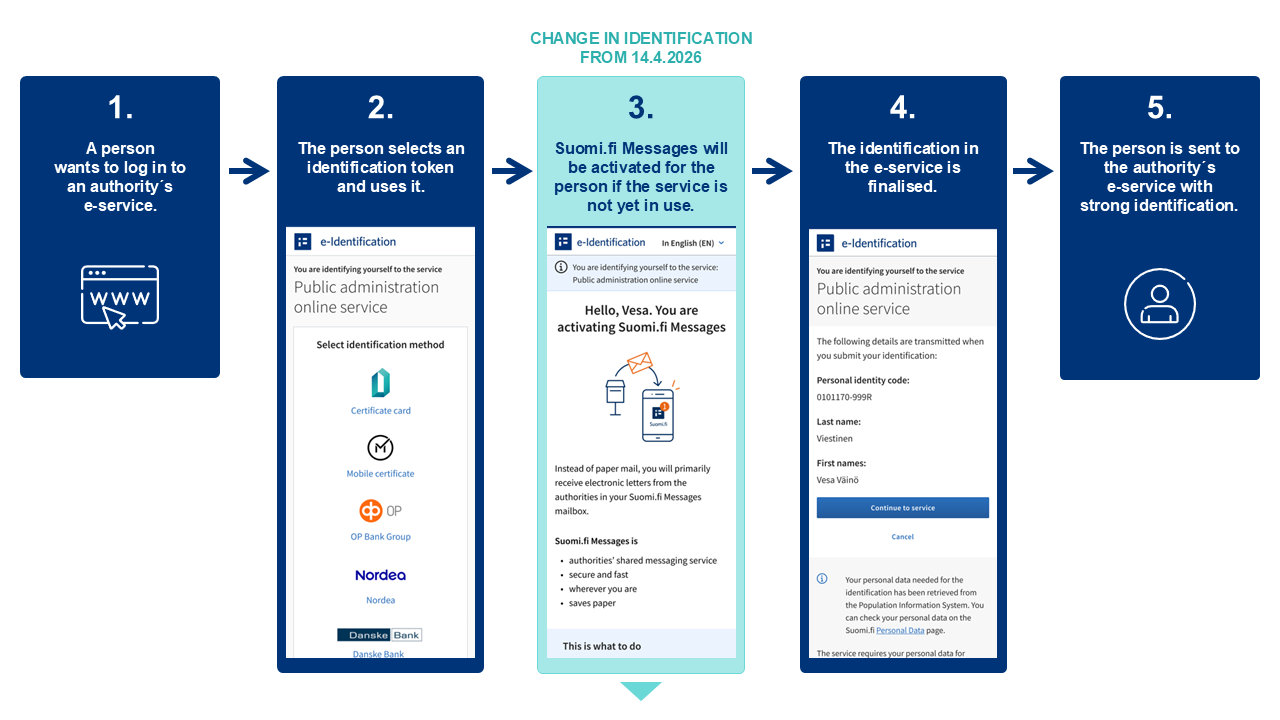
You will get a notification in your Suomi.fi Messages when you have a new decision or letter available in the OmaKela e-service.
The notification will be sent to the email address you have registered in the Suomi.fi service. If you have installed the Suomi.fi application to your phone, you will also get a notification via the application. You can update your email address in the settings of Suomi.fi Messages if your email address changes. Read the instructions on how to update your email address (suomi.fi).
If you do not use Suomi.fi Messages, you will get a notification from Kela by email or text message. You can check and edit your contact information under Päivitä omia tietojasi (Update your own information) in OmaKela.
Suomi.fi Messages is a service offered by the Digital and Population Data Services Agency. You can use the service to read messages that public authorities have sent to you. You can read the messages either in the Suomi.fi application or at www.suomi.fi/messages.
Once you have activated Suomi.fi Messages, you will receive most of the letters sent by public authorities through the service instead of via paper mail. Kela will still deliver decision notices and letters to you via OmaKela. You will get a notification in your Suomi.fi Messages when you have new mail in OmaKela.
More information about Suomi.fi Messages:
Report changes in OmaKela
If your life situation changes, it may affect the benefits you get from Kela. You can report changes in the OmaKela e-service. Go to Tee hakemus tai ilmoita muutoksista (Submit an application or report changes) in OmaKela.
In many cases, a change in your circumstances means that you have to submit a new application. For example, if the change affects your housing allowance (asumistuki), you must submit an application for the review of your housing allowance (asumistuen tarkistushakemus). If Kela pays you social assistance (toimeentulotuki) and your income changes, you must submit a notification of changes (muutosilmoitus).
When you report a change in your circumstances, Kela will review the benefit decisions Kela has issued to you. This will help Kela check if and how the change affects your benefits.
More information about how changes in your life situation can affect your benefits.